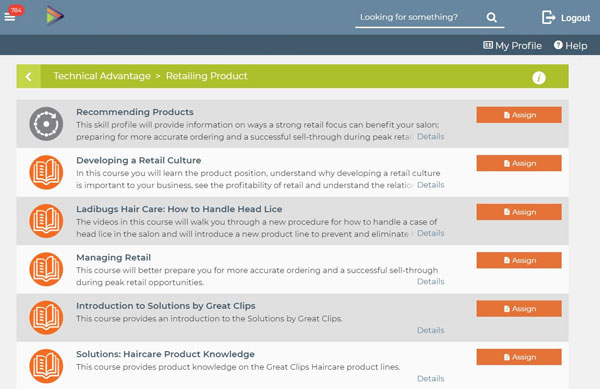
Great Clips University's education program ✂️ (GCU) is a combination of online and in-person learning. You'll find many courses focused on product retail! All of these valuable resources and more are available exclusively to Great Clips stylists, allowing them to continue their education and advance their skills!
Log in GCU Academy
To log into the portal, you need to go to the special page gcudashboard.greatclips.com. Then choose one of the options: «Salon Employee» or «GM/Franchisee/Corp».
Log in As Salon Employee
After choosing this authorization method, you need to fill out 2 fields:
- Enter your login ID (e-mail address).
- Enter Password.
After login, you will have access to courses: Recommending Products, Developing a Retail Culture, How to Handle Head Lice, Managing Retail, Introduction to Solution, Haircut Product Knowledge, Kids Product Knowledge, etc.

In case of an error, you will receive a message: «You have entered an incorrect login or password. Please try again». If you have forgotten your password, you have 2 options to solve it:
- Recover password:
- Click on Forgot Password/Re-activate Account.
- Then enter your email and click Reset Password. On the screen, you will see a message «If you entered a valid account in the system, you will receive an email shortly with instructions on how to reset your password. Please check your email for the reset token».
- Go to your mailbox and use the step-by-step instruction.
- Use the hint you specified during registration to remember the password:
- Click Password Hint.
- Enter your login (your email) and click «Password Hint» again. A message will appear on the screen: «If you entered a valid account in the system, you will receive an email shortly with your password hint».
- Check your e-mail. If you don't see the letter, check the Spam folder.
Note! If the hint didn't help, use the first method.
Sign In As GM/Franchisee/Corp
When choosing this method for login, you need to:
- Enter your email in the first field.
- Enter PassCode in the second field and click Sign In.
If an error occurs, you can reset your password:
- Click on Reset.
- Enter your email address associated with Great Clips.
- Wait for an email with a link for resetting your password. Then follow the procedure.